Help Portal Help Centre home page
Contact Cision Support Submit a request
Sign in
  1. Help Portal
  2. Contacts
  3. Lists

Articles in this section

  • Handle a folder and list structure
  • Edit a new contact
  • Edit list names
  • Import lists
  • Combine lists
  • Delete lists
  • Opt-out 

Edit list names

Elin Westerlund
  • 30 September 2021 12:47
  • Updated
Follow
  1. Click Contacts – LISTSmceclip0.png
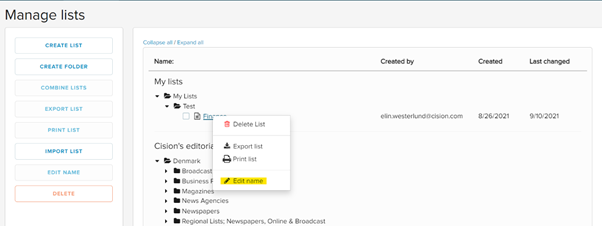
  2. Right click on the list that you want to rename.mceclip1.png
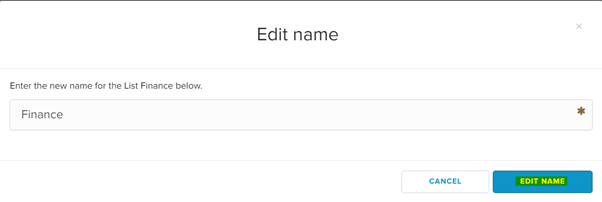
  3. Change the name, and press EDIT NAME.mceclip2.png

The name is now changed.

  • Facebook
  • Twitter
  • LinkedIn
Was this article helpful?
0 out of 0 found this helpful
Have more questions? Submit a request
Return to top

Related articles

  • Add/edit contact information on Cision News
  • Combine lists
  • Import lists
Help Portal
English (United Kingdom) Svenska