
- Go to Contacts – LISTS.

You will find the lists that has been created for you or by you under “My Lists”, but also the lists that has been imported through the import tool.
If the lists are structured into different folders, it will be easier to move the lists between folders by dragging and releasing the lists between the different folders. You can also have sub folders, that way a clear structure can be built.
By right clicking on a list, you can use functions like “Delete list”, “Export list”, “Print list” and “Edit name”. If you right click on a folder, you will be able to use the functions “Delete Folder”, “+Create list”, “+Create folder” and “Edit name”.
A folder cannot be deleted before the containing lists before moving or deleting.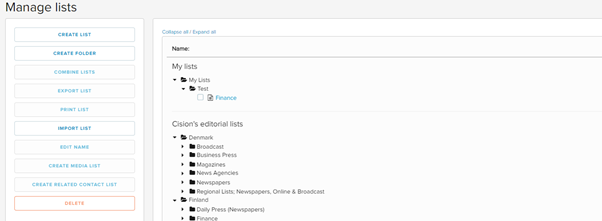
See more guides below:
CREATE A LIST – Here you create a new empty list.
CREATE A FOLDER – Here you create a new folder.
JOIN LISTS – Here you can join 2 or more lists into 1 list.
IMPORT LISTS – Here you can import your own contacts into lists.
REGISTER NAME – Here you can change the name of a list.
DELETE – Here you can delete lists or folders.